Abode
- 2.3
- Rating
- 100.00K
- Installs
- Free
- Price

 Analysis by App-foxy
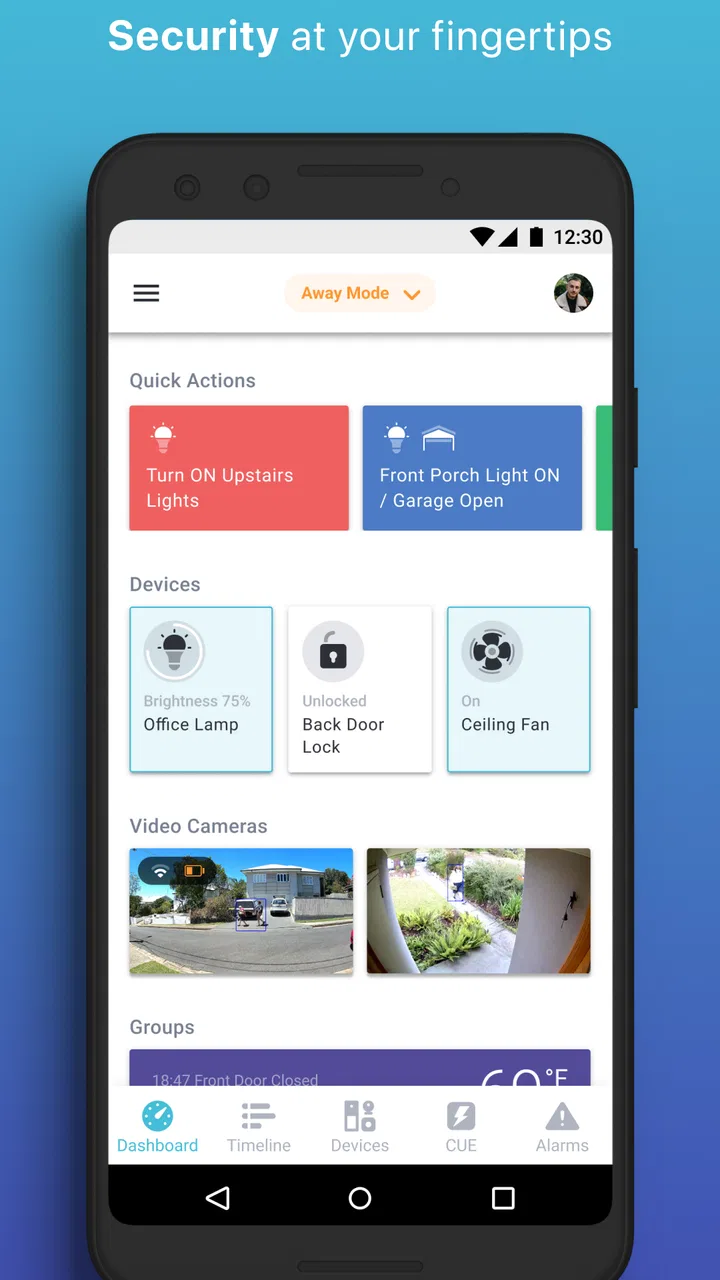
Abode is a lifestyle app from Abode Systems Inc. that puts the focus on managing a home security setup without tying the user to a long-term contract. I approached it less like a general smart-home dashboard and more like a practical control point for people who want to check on their home, react to an alert, and keep security decisions in their own hands.
That distinction matters. A security app is not judged only by how attractive its screens look; it is judged when something unexpected happens while I am away. Can I understand the alert quickly? Can I decide what to do without calling a monitoring company first? Can I use the system as part of an ordinary routine rather than remembering it only when I travel? Abode is built around those questions, and that gives it a clear identity within the lifestyle category.
The app is free to install and is rated for Everyone, while optional in-app purchases range from a few dollars to considerably more depending on the item. It has passed the hundred-thousand-install mark and holds an average rating of about 2.3 from roughly 1,700 ratings, alongside more than 700 written reviews. Those figures suggest a product with a meaningful user base but also a noticeable amount of frustration, so I would not recommend treating the download as an automatic guarantee of a smooth experience.
You May Also Like

 Pandora - Music & Podcasts
Pandora’s Music Is Easy to Start, but Harder to Recover
Pandora’s strength is its low-effort path from a seed to a station. Its weak spot is how much confidence it asks you to place in connection, setup, and quiet recovery.

 8 Ball Pool
 Is Built on Rivalries, Rematches, and Routine
A close look at the rivalries, rematches, shared routines, and unanswered safety questions that turn a quick pool match into a persistent mobile community.

 Samsung Music
’s Quiet Strength Is Playing What You Already Own
Its reach comes less from spectacle than from dependable access to a personal library. That simplicity is both the app’s strongest retention engine and its ceiling.

 AccuWeather: Weather Radar
AccuWeather Review: A Quick, Clear Forecast for Everyday Decisions
For everyday plans, the best forecast is the one you can understand quickly. AccuWeather makes rain timing, radar, and local conditions easy to act on, with a few trade-offs.

 Hill Climb Racing
Why Hill Climb Racing Still Turns Crashes Into One More Run
A tiny car, a bumpy hill and one more upgrade: Hill Climb Racing keeps resurfacing because its simple chaos makes every near-miss feel personal.

 AliExpress - Shopping App
AliExpress Makes Global Shopping Feel Personal, but Shoppers Bear the Risk
AliExpress turns a global marketplace into a pocket-sized discovery engine. Its reach is useful, its shopping loop compelling, and its trade-offs easy to miss.
More From Our News Desk
View All News


Why contract-free home security changes the experience
I like that Abode’s contract-free approach puts the security routine in my hands, but that freedom is most useful when I’m clear about what I expect to handle myself. In this section, I’d look at how that choice affects everyday responsibility and what it means to stay involved when an alert needs attention.
A control-first approach instead of a service-first approach
The central appeal is the possibility of using a home security system without a long-term contract. In practical terms, that gives me more freedom over how I organize protection at home. I can think about the equipment and the app as tools I control, rather than assuming that the main value comes from staying subscribed to a traditional security provider.
That freedom is especially useful for renters, people who move between homes, and households that do not want to make a long commitment before understanding whether a security setup fits their routine. It also changes how I evaluate the application. The important question is not whether it replaces every professional security service. The better question is whether it gives me a manageable way to stay informed and respond when I am available to do so.
In my experience, the strongest idea here is direct control over everyday security decisions. I can use the app as a bridge between the physical security system and my own judgment. That is different from relying entirely on a company to interpret every event for me, and it can feel more transparent when I want to know what is happening in my own home.
What this means for daily habits
A security app becomes useful when it fits naturally into routines. I would use Abode when leaving the house, arriving home, checking the property during a trip, or responding to an event that needs attention. The value is not limited to emergencies. Regularly checking the system can help me notice whether I have actually secured the home before leaving, rather than relying on memory.
There is also a psychological benefit to separating awareness from panic. If I know where to look when an alert appears, I am less likely to react impulsively. I can open the app, examine the situation, and decide whether it is a false alarm, something I should investigate, or a reason to contact someone nearby. That workflow is simple, but it is more useful than a security product that only makes me feel protected without helping me act.
How I would set up a dependable routine
I would begin by deciding which moments matter most: leaving for work, going to bed, leaving for a weekend, and returning home. Each moment should have a clear action in the app. I would avoid creating a complicated routine that depends on perfect memory, because complexity is one of the fastest ways for a security system to become background noise.
My practical tip is to treat the application as a confirmation tool, not just an emergency tool. After setting the home for the appropriate state, I would make a habit of checking the result before walking away. That small pause can prevent a common mistake: assuming the system changed state when the action was interrupted or overlooked.
I would also make sure other people in the household understand the same routine. A system that only one person knows how to operate creates an avoidable weakness. If someone else is responsible for the home while I am away, they should know how to check an alert and how to avoid turning an ordinary arrival into confusion.
A realistic day-to-day scenario
Imagine leaving for a short trip while a neighbor checks the house. Before departing, I would use Abode to confirm that the home is secured, then tell the neighbor what kind of notification deserves a response and what kind can wait. If an alert arrives during the trip, I would first review it through the app rather than immediately assuming the worst.
If the event looks harmless, I can contact the neighbor and ask for a quick visual check. If it appears more serious, I can decide whether to return, ask someone nearby to help, or contact the appropriate emergency service. The app does not remove the need for judgment; its real benefit is giving me a faster place to begin that judgment.
This scenario also exposes an important limitation. A contract-free approach works best when the owner is willing to participate. If I am frequently unavailable, unable to check notifications, or expecting a fully managed response at all hours, a professionally monitored alternative may be a better fit. Abode can support my decisions, but I should not confuse personal control with automatic intervention.
Where the app feels different from ordinary alternatives
Compared with a basic camera application, Abode is more closely associated with the broader idea of home security rather than simply viewing a live image. A camera app may be enough for checking a room, a pet, or an entrance, but it does not necessarily encourage the same whole-home routine. Abode makes more sense when I want security to be an organized part of leaving, returning, and checking the property.
Compared with a traditional provider, the contract-free positioning is the main difference. A conventional service may appeal to someone who wants a managed relationship and less personal responsibility. Abode is more attractive to someone who prefers flexibility and is comfortable learning the system, checking alerts, and deciding what action is appropriate.
Compared with a general smart-home app, the security focus is also meaningful. A broad home-control application may bring together lighting, entertainment, appliances, and other devices, but security events can become just another notification among many. Abode is easier to justify when security is the priority and convenience features are secondary.
The tradeoff behind the lower commitment
Freedom always comes with responsibility. Without a long-term contract, I may have more control over the arrangement, but I also need to pay closer attention to how the system is used and maintained. I should not download the app expecting it to solve every security problem by itself. The quality of the overall experience depends on the surrounding setup, my habits, and how quickly I respond when something needs attention.
The relatively low average rating is a reason to be realistic. It does not tell me that every user will have the same problem, but it does warn me that setup, reliability, account handling, or day-to-day expectations may not work equally well for everyone. I would test the most important actions early rather than waiting until a holiday or emergency to discover that the workflow is not comfortable.
My advice is to perform a personal trial period. Use the app during normal departures, check how easily you can understand an alert, and ask another household member to follow the same process. If either person finds the controls confusing, that is valuable information before depending on the system more heavily.
Costs and commitment deserve a close look
The application itself is free, but optional purchases can cost from $3.99 to $245.99 per item. I would therefore separate the cost of downloading the app from the cost of building or expanding the security setup. A free app can still be part of a larger paid arrangement, and the most sensible choice depends on what I already own and what level of protection I actually need.
Before buying anything, I would write down the specific problem I want to solve. Is it checking the home while away, improving awareness at an entrance, or creating a more consistent leaving routine? Buying without answering that question can lead to an expensive collection of equipment that adds notifications without adding useful confidence.
There is a further tradeoff between coverage and simplicity. More security components may give me more information, but they can also create more events to interpret and more routines to remember. For a small home or a person who wants a straightforward system, a focused setup may be better than trying to monitor every possible detail.
Who will gain the most from Abode
I see the best match in people who want a flexible home security approach and are comfortable being involved. Renters and homeowners who dislike long commitments may appreciate the contract-free direction. So may technically confident users who want to understand their own security workflow instead of handing every decision to a provider.
It can also suit households that need a practical way to coordinate responsibility. If one person leaves early, another arrives late, and a neighbor occasionally checks the property, having a common app-based routine can reduce misunderstandings. The benefit comes from shared clarity, not from simply having another icon on a phone.
I would be more cautious recommending it to someone who wants a completely hands-off service. If the main priority is professional response without personal involvement, a traditional monitored solution may be worth the additional commitment. I would also hesitate for anyone who dislikes troubleshooting or who tends to ignore notifications, because a security app cannot help much when its alerts are routinely dismissed.
Small practices that make the experience better
One useful habit is to keep security checks tied to physical actions. When I lock the door, I can confirm the corresponding state in the app. When I return, I can check that the home is in the expected mode rather than assuming the transition happened automatically. Linking the digital step to something I already do makes the routine easier to remember.
Another is to review notifications when I am calm. I would learn what a normal alert looks like and decide in advance whom to contact if I am away. This avoids making a complicated decision while distracted, driving, or half asleep. It also helps reveal whether the app is giving me useful information or simply too many interruptions.
A third is to keep the system understandable for guests and family members without giving everyone unlimited responsibility. The person watching the home should know the basic response path, while the owner remains responsible for more sensitive decisions. That balance can make the contract-free model feel empowering rather than isolating.
My final assessment
Abode is most convincing when I view it as a personal control layer for home security, not as a universal replacement for every security service. Its contract-free identity gives it a clear advantage for people who value flexibility, want to stay involved, and prefer to decide how their home is monitored and how alerts are handled.
At the same time, the modest average rating means I would approach it with practical expectations. I would test the workflow, consider the cost of optional purchases, and decide whether I genuinely want to take responsibility for responding to events. The app is free and suitable for Everyone, but the broader security decision still requires thought.
My recommendation is therefore conditional but positive: choose Abode if you want a security-focused app that supports your own routines and you are willing to participate in the process. Skip it in favor of a fully managed alternative if convenience means never having to interpret an alert or coordinate a response. For the right user, its greatest strength is not a flashy feature; it is the ability to make home security feel like something I can actively manage on my own terms.
FAQs for Abode
01What is Adobe, and what can I use it for?
Adobe is a collection of creative and productivity applications rather than a single app. Depending on the specific Adobe product you download, you can edit photos, design graphics, create PDFs, produce videos, draw illustrations, or manage documents. Popular mobile options include Adobe Acrobat Reader, Photoshop Express, Lightroom, Premiere Rush, and Adobe Express. Each app has different tools, system requirements, and subscription features, so checking the exact app listing is important before installing it.
02Is Adobe free to download and use on Android or iOS?
Most Adobe mobile applications can be downloaded for free, but the free version usually provides only basic tools or includes usage limits. Advanced editing features, premium templates, cloud storage, export options, and professional tools may require an Adobe subscription or an in-app purchase. Some apps offer a free trial, although trial conditions can vary by region and subscription type. Review the pricing details carefully before confirming any purchase.
03Do I need an Adobe account to use the app?
An Adobe account is commonly required for accessing cloud services, synchronizing projects, saving files online, and using premium features. Some basic functions may be available without signing in, depending on the application, but creating an account generally provides a more complete experience. If you already use Adobe products on a computer, signing in with the same account can help synchronize documents, assets, presets, and projects across supported devices.
04Can Adobe apps work offline on a phone or tablet?
Many Adobe apps offer at least some offline functionality, but the available tools depend on the specific application and whether you have signed in or subscribed. For example, locally stored files may remain accessible without an internet connection, while cloud documents, online fonts, templates, synchronization, and license verification may require connectivity. It is best to open and prepare important projects while online if you expect to work during travel or in areas with limited service.
05Are Adobe mobile apps suitable for beginners, or are they only for professionals?
Adobe mobile apps can be useful for both beginners and experienced creators, although the learning curve varies considerably between products. Apps such as Adobe Express and Photoshop Express are relatively approachable because they provide templates, guided adjustments, and simplified editing tools. More advanced applications may require familiarity with layers, masking, file formats, or professional workflows. Beginners can start with the basic features, but premium tools may take time and practice to master.
Pros
- Clean
- intuitive interface makes core tools easy to find.
- Supports common document and creative file formats.
- Useful cloud access keeps projects available across devices.
- Strong sharing and collaboration options for team workflows.
- Regular updates add features and improve overall reliability.
Cons
- Many advanced tools require a paid subscription.
- Large projects can use significant storage and device resources.
- Some features may feel overwhelming for first-time users.
- Offline functionality is limited for cloud-based workflows.
- Performance can vary on older phones and tablets.

Abode
Gallery